Short answer: Sponsored Products (SP) promote one product in search results and on product pages, and suit almost every seller. Sponsored Brands (SB) show your logo, a headline and several products at the top of search, and need Brand Registry. Sponsored Display (SD) reaches shoppers who viewed or bought related products, on and off Amazon. Start with SP, add SB, then SD.
Most brands we audit run all three ad types from day one, with the same budget logic for each. That is usually where the money leaks. Each ad type does a different job, reaches a shopper at a different moment, and should be judged on a different number.
This guide explains what each type does, who can run it, and the order we add them in for brands selling on Amazon.in. Amazon changes ad features often, so we link to Amazon’s own pages for every rule and date-stamp this review.
Three terms we use throughout:
- ACoS (advertising cost of sales) = ad spend ÷ sales from ads × 100. Amazon’s own formula.
- TACoS (total ACoS) = ad spend ÷ total sales, ads plus organic, × 100.
- ROAS (return on ad spend) = sales from ads ÷ ad spend. A ROAS of 4 is the same as an ACoS of 25%.
What is Sponsored Products on Amazon?
Sponsored Products is a cost-per-click ad for one product listing. It appears in search results and on other products’ detail pages, and you pay only when someone clicks.
It is the ad type closest to the sale. The shopper has typed a search, your product appears among the results, and one click takes them to your listing. Amazon describes SP as “self-service, cost-per-click ads for individual product listings”.
You can target in two ways:
- Automatic targeting. Amazon matches your ad to searches and products using your listing content. It has four groups: close match, loose match, substitutes and complements.
- Manual targeting. You choose the keywords (broad, phrase or exact match) or the products and categories you want to appear against.
Any seller with an active listing that can win the Buy Box can usually run SP. You do not need Brand Registry. Amazon says there is no minimum spend; you set a daily budget.
What is Sponsored Brands, and who can run it?
Sponsored Brands is a cost-per-click or cost-per-thousand-viewable-impressions ad that shows your brand logo, a custom headline and several products, usually at the top of search results. Sellers must be enrolled in Amazon Brand Registry.
Amazon lists three Sponsored Brands formats:
- Product collection: your logo, headline and several products, with a lifestyle or brand image.
- Store spotlight: sends shoppers to your Brand Store. Amazon says the Store needs at least three sub-pages, each with a unique product.
- Video: a 6 to 45 second video that plays in search results for selected keywords.
SB does a different job from SP. It is less about one product winning a click and more about a shopper seeing your brand name above the results, then browsing your range. That is why we judge SB partly on brand searches and new-to-brand orders, not only on ACoS.
If you do not yet have Brand Registry, read Amazon India’s Brand Registry requirements. You need a registered or pending trademark from an eligible trademark office.
What is Sponsored Display, and when does it make sense?
Sponsored Display is Amazon’s self-service display ad. It reaches shoppers by the products they are viewing or by what they have viewed or bought before, on Amazon and on third-party sites and apps. It is open to Brand Registry sellers and vendors.
SD has two broad ways to target:
- Contextual targeting: show your ad on specific product pages or categories, for example a competitor’s product page or a complementary category.
- Audiences: Amazon audiences by interest, views remarketing (people who viewed your product or similar products but did not buy) and purchases remarketing (people who bought your product or a related one).
You can pay per click or per thousand viewable impressions (vCPM).
SD is the furthest from a typed search. That makes it useful for bringing back shoppers who almost bought, and weak as a first ad for a brand nobody has seen yet. Without traffic, your remarketing audiences stay small.
How do the three ad types compare?
The quickest way to choose is to look at where each ad appears and what it needs.
| Sponsored Products (SP) | Sponsored Brands (SB) | Sponsored Display (SD) | |
|---|---|---|---|
| What it promotes | One product | Your brand and several products, or your Store | One product, shown to an audience or on a product page |
| Where it appears | Search results and product pages | Top of and within search results, product pages | Product pages, Amazon pages, and third-party sites and apps |
| Brand Registry needed? | No | Yes (for sellers) | Yes (for sellers) |
| How you pay | Cost per click | Cost per click or vCPM | Cost per click or vCPM |
| Best job | Winning sales on searches | Brand visibility on category searches | Remarketing and defending product pages |
| Number we watch first | ACoS against margin | New-to-brand orders, brand search growth | Sales from remarketing, TACoS |
Sources: Amazon Ads guides on ad products, Sponsored Brands and display ads.
Which Amazon ad type should you start with?
Start with Sponsored Products. It is the only type with no Brand Registry requirement, it sits closest to a buying search, and its search term report shows you which keywords convert, which you need before SB and SD can work well.
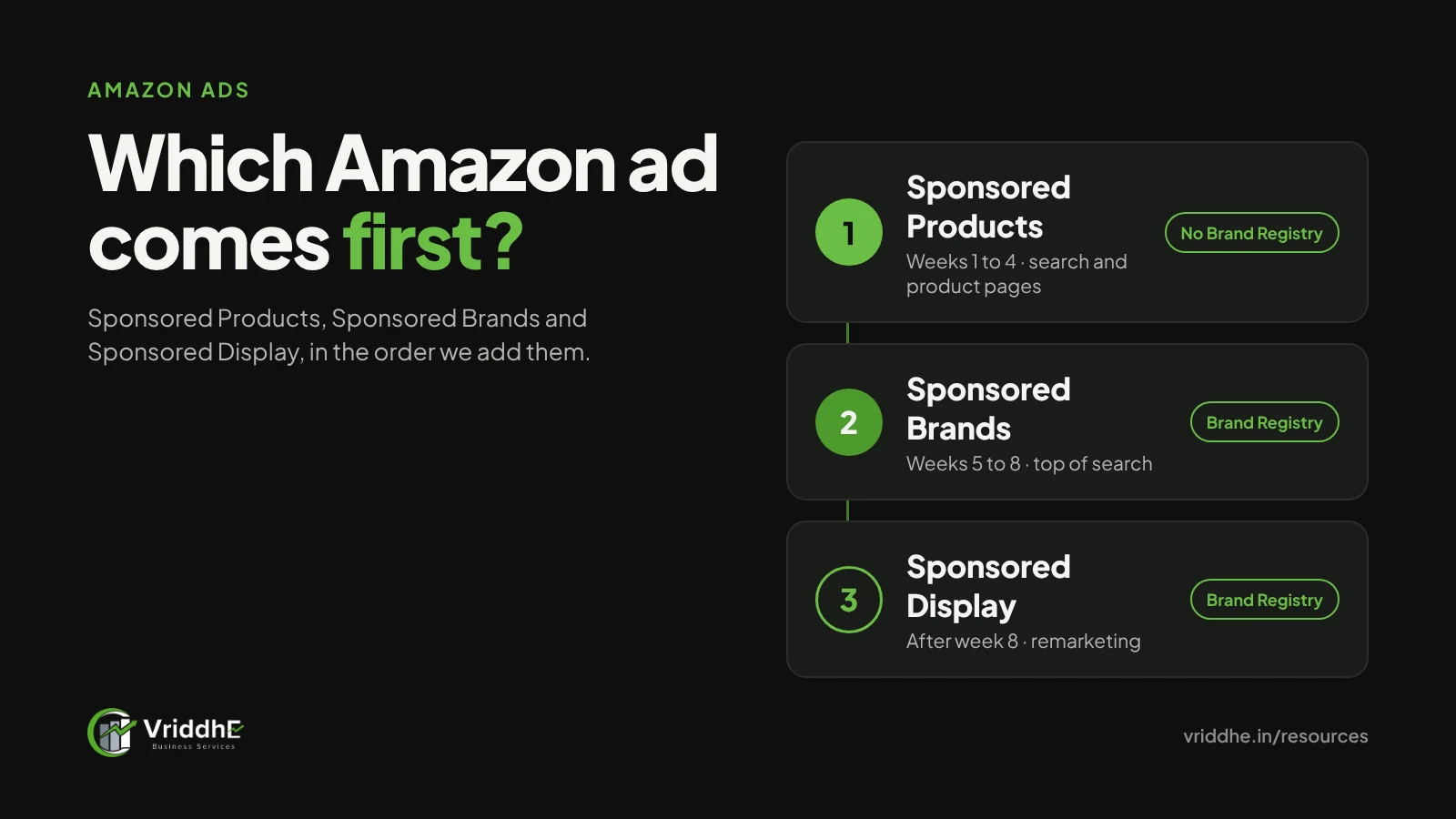
Our usual order for a new brand on Amazon.in:
- Weeks 1 to 4: SP only. One automatic campaign for discovery, plus manual exact and phrase campaigns on the 10 to 20 keywords you are sure about. Amazon’s own best-practice guide says to add manual campaigns alongside an automatic one in the first 30 days.
- Weeks 5 to 8: add SB on the category keywords that already convert in SP. Use your best-reviewed products in the creative.
- After about 8 weeks: add SD, starting with views remarketing on your own products. By then there is enough traffic for the audience to be worth reaching.
This is a starting order, not a rule. A brand with strong reviews and a well-known name may add SB earlier. A brand selling a ₹300 item with thin margin may never find SD worth it.
How should you split a ₹50,000 monthly budget?
Here is a worked example. The numbers are illustrative, not a benchmark.
Assume a home décor brand sells a ₹2,000 product. After product cost, Amazon fees, shipping and GST, it keeps ₹600 before ads. That is a 30% margin, so its break-even ACoS is 30%. Above that, each ad sale loses money. (Our ACoS playbook explains how to set targets by product.)
A first split we might test in month three:
| Ad type | Share | Monthly spend | Target |
|---|---|---|---|
| SP, exact and phrase | 50% | ₹25,000 | ACoS under 25% |
| SP, automatic and product targeting | 20% | ₹10,000 | ACoS under 30%, mined weekly for new keywords |
| SB, product collection or video | 20% | ₹10,000 | ACoS under 35%, with new-to-brand orders tracked |
| SD, views remarketing | 10% | ₹5,000 | ACoS under 30% |
If SP exact campaigns hit ₹25,000 spend at 20% ACoS, they bring about ₹1,25,000 in ad sales. If total sales that month, ads and organic, are ₹4,00,000 and total ad spend is ₹50,000, TACoS is 12.5%. We watch TACoS because it shows whether ads are building organic sales or only buying them.
How do you measure each ad type fairly?
Measure each ad type against its own job, not one blended ROAS. A single target makes SP look great and SB look poor, even when SB is the reason shoppers searched for your brand name.
What we check weekly:
- SP: ACoS by campaign against each product’s break-even, and the search term report for new keywords and negatives.
- SB: new-to-brand orders, branded search volume over time, and ACoS on category keywords.
- SD: sales from remarketing audiences, and whether TACoS moves.
On one large home improvement account, restructuring automatic SP campaigns into keyword-led groups (generic, brand and competitor) was part of the work that took TACoS from above 11% to under 9%. Read the LAPO case study for what else changed.
Common mistakes, and when this does not apply
Common mistakes we see:
- Running SB before the listing converts. If a product page converts poorly, more brand visibility mostly buys expensive clicks.
- Using one ACoS target across all three types.
- Starting SD on a new product with almost no traffic. The remarketing audience is too small to spend against.
- Never adding negative keywords to automatic SP campaigns.
- Judging a campaign after three days. Give a new campaign at least two weeks of steady budget before deciding.
When this order does not apply:
- You are a vendor (selling to Amazon) rather than a seller. Eligibility and some reporting differ.
- You sell in a category with ad restrictions. Check Amazon’s ad policies before you build campaigns.
- You run a large catalogue where a few products bring most sales. Then budget follows those products first, whatever the ad type.
FAQ
Do I need Brand Registry for Sponsored Products?
No. Sponsored Products is open to sellers without Brand Registry. Sponsored Brands and Sponsored Display need sellers to be enrolled in Brand Registry.
Is Sponsored Display the same as Amazon DSP?
No. Sponsored Display is self-service and bought inside the same Amazon Ads console as SP and SB. Amazon DSP is a separate programmatic platform for buying display and video ads, with its own setup and buying options.
Which ad type gives the lowest ACoS?
Usually Sponsored Products on exact-match keywords, because the shopper’s search closely matches your product. That does not make it the only ad type worth running.
Can I run Sponsored Brands video without a Brand Store?
Yes. Store spotlight needs a Store with at least three sub-pages, but video and product collection formats do not need a Store as the landing page.
How often should I change bids?
We review the top products daily and the full account weekly. Large daily bid swings make it hard to know what worked.
How much should I spend on Amazon ads per month?
Work back from margin, not from a round number. Set a break-even ACoS per product, then fund the campaigns that stay under it.
Want a second opinion on your ad structure?
We are an Amazon Ads Verified Partner and run SP, SB and SD for brands across home, décor and lifestyle categories. See how we manage Amazon advertising (PPC), or ask for a free growth audit and we will review your campaign structure and tell you what we would change first.