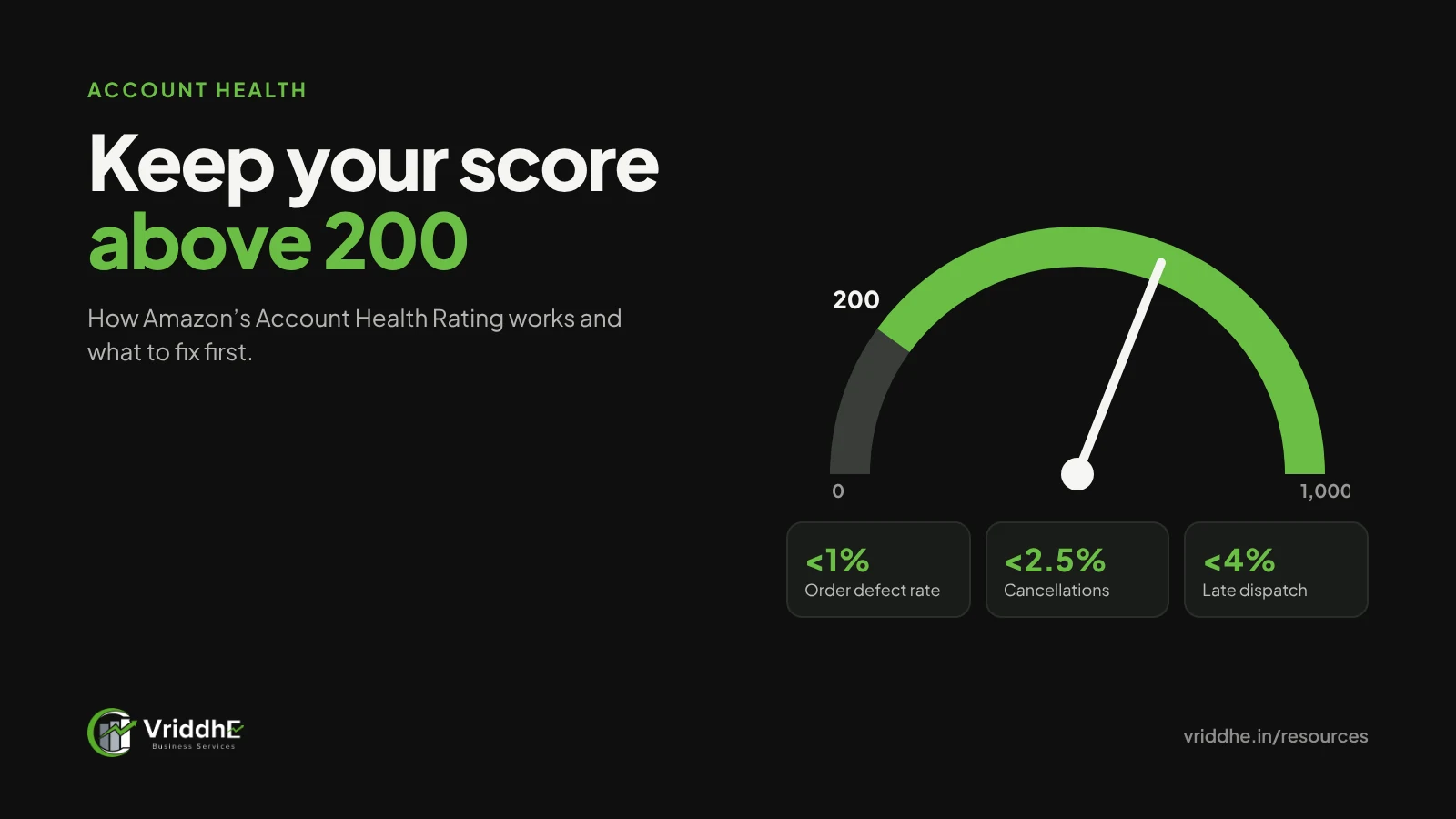
Short answer: Amazon’s Account Health Rating (AHR) is a score from 0 to 1,000 that shows whether your seller account is at risk of deactivation because of policy violations. Amazon treats any score above 200 as healthy. To raise a falling score, resolve each open violation on your Account Health page; deleting the listing does not fix it.
Most account problems we are called in to fix did not start with a suspension. They started with a small warning that nobody opened, a listing that went inactive, or a customer complaint that turned into a policy flag. By the time the score turned red, the fix took weeks instead of a day.
This guide explains what the Account Health Rating measures, which other numbers sit next to it in Seller Central, and the routine we follow on the accounts we manage. Amazon updates these policies often, so check your own Account Health page before acting on any rule here.
What is Amazon’s Account Health Rating?
The Account Health Rating is a colour-coded score from 0 to 1,000 on your Seller Central Account Health page. Amazon says it “lets you know if your selling account in a particular store is at risk of deactivation”. A score above 200 is healthy.
Three points from Amazon’s own explanation are worth knowing:
- It is driven by policy violations. Amazon says the score “won’t decrease below 200 unless you have policy violations”. Low order volume alone will not push you below 200.
- Violations have four severity levels: critical, high, medium and low. You can stay healthy with non-critical violations, provided you deal with them quickly.
- The score is not a shield. Amazon says it may deactivate an account immediately if it suspects fraudulent, deceptive, illegal or otherwise harmful activity, whatever the score.
The rating is per store. If you sell on Amazon.in and abroad, check each one.
Which other account health numbers should Indian sellers watch?
Beside the rating, Seller Central shows performance metrics with targets. Amazon India’s seller blog lists three limits: order defect rate below 1%, order cancellations below 2.5%, and late dispatch below 4%.
| Metric | What it counts | Amazon.in target |
|---|---|---|
| Order defect rate (ODR) | Orders with negative feedback, an A-to-z Guarantee claim or a chargeback | Under 1% |
| Cancellation rate | Orders the seller cancels before dispatch | Under 2.5% |
| Late dispatch rate | Orders dispatched after the expected date | Under 4% |
Source: Amazon.in seller blog. If you cross one of these, Amazon asks for a Plan of Action covering the root cause, the fix and the long-term prevention.
A quick example. If you shipped 1,200 orders in the period Amazon measures, a 1% ODR limit means fewer than 12 orders can carry a defect. Two bad weeks of packaging damage can use that up.
What usually brings the rating down?
In our experience, most drops come from listing and product policy flags rather than delivery metrics. The common ones:
- Intellectual property complaints. A rights owner reports a listing for trademark, copyright or design infringement. This includes images copied from another brand.
- Product authenticity complaints. A customer or Amazon questions whether an item is genuine. Keep invoices from your supplier or manufacturer ready.
- Listing policy violations. Wrong category, misleading claims, or using an existing product page for a different item. Amazon India also lists using variations to pass off a new item as an existing one.
- Restricted products. Items that need approval or are not allowed in a category.
- Review policy issues. Any attempt to influence reviews, including offers in exchange for reviews.
Amazon also notes that violations on listings you have since deleted still count, and must be resolved through the Account Health page.
What should you do when your Account Health Rating drops?
Act the same day, fix the cause before you appeal, and write one clear response per violation. Speed matters because non-critical violations can be cleared while you are still healthy.
Our step-by-step:
- Open Account Health and list every open item. Note the severity, the ASIN, the policy named and any deadline.
- Read the exact policy linked to each item. Do not guess the reason from the title of the notice.
- Fix the root cause first. Correct the listing, remove copied images, pull stock you cannot prove is genuine, or fix the dispatch process.
- Collect evidence. Invoices, letters of authorisation, trademark certificates, photos of packaging, courier records. Make sure names and addresses match your account.
- Write a Plan of Action when asked. Three short parts: what caused the problem, what you have already fixed, and what you have changed so it does not happen again. Keep it factual and specific.
- Submit through Account Health, not by deleting the listing. Amazon is clear that the score improves only when you address the violation on the Account Health page.
- Record what happened. A simple sheet of past violations and fixes stops the same mistake from returning.
Amazon India’s IP guide for sellers explains how rights complaints work. If an IP complaint is wrong, contact the rights owner and ask for a retraction rather than arguing with Amazon. If it is right, remove the listing content and change your process.
How do you keep the rating healthy every week?
Give account health a fixed weekly check, the same way you review ads. Most serious problems show early signs that a 20-minute review would catch.
Our weekly checklist:
- Open Account Health and clear any new warning within 48 hours.
- Check ODR, cancellation and late dispatch against the limits above.
- Review new negative feedback and A-to-z claims, and reply to each.
- Search your own brand on Amazon for copies of your listings or images.
- Check stock on top products, since cancellations often come from selling items you no longer have.
- Check that new listings use your own images and accurate claims.
- Note every change in a log, so the next person knows what was done.
For one gifting and décor brand facing copied designs, a weekly process to find and report IP violations became part of the account routine. The Gold Art India case study covers what else changed. Listing accuracy matters too, and our listing optimisation guide covers the rules for titles and keywords.
Common mistakes, and when this does not apply
Common mistakes:
- Deleting the listing to make a warning go away. The violation stays open.
- Sending a long, emotional appeal. Short and factual works better.
- Appealing before the cause is fixed.
- Using supplier invoices where the names or addresses do not match the account.
- Ignoring low-severity warnings because the score is still above 200.
When this does not apply:
- Your account is already deactivated. Then you need a reinstatement appeal, which is a separate process; follow the instructions in your deactivation notice.
- You are a vendor rather than a seller. Vendor accounts are managed differently.
- The issue is a verification or KYC hold. That is about account information, not policy violations, and needs matching documents rather than a Plan of Action.
FAQ
What is a good Account Health Rating on Amazon?
Amazon treats any score above 200 as healthy. Many sellers sit well above it. What matters more is that every open violation is addressed quickly.
Does deleting a listing improve my Account Health Rating?
No. Amazon says the rating improves only if you address the violations on your Account Health page. Violations on deleted listings still count.
Can low sales affect my rating?
Amazon says the score will not drop below 200 unless you have policy violations. Low volume can make each defect weigh more on your ODR, though.
What is a Plan of Action on Amazon?
A written response explaining the root cause of a problem, the steps already taken to fix it, and the changes made to prevent it happening again.
How long does it take for the rating to recover?
Amazon does not give a fixed time. Resolving open violations is what moves it. Check the Account Health Rating programme policy in your Seller Central for details.
Can Amazon suspend an account with a healthy rating?
Yes. Amazon says it may deactivate an account immediately if it suspects fraudulent, deceptive, illegal or harmful activity, regardless of the score.
Need help with an account health issue?
We manage Amazon seller accounts end to end, including account health, catalogue and IP protection. See our marketplace account management service and how we work on Amazon, or book a free growth audit and we will review your Account Health page with you.